
Casinotokyo Casino Registration
Casinotokyo Casino registration takes 2 to 3 minutes and creates your account on casinotokyo.eu. We allow one profile per person, so start with details that belong to you. Keep access to the email address or phone number used during sign-up. After confirming that contact, sign in and prepare for identity checks before requesting a payout.
Before You Register at Casinotokyo Casino
Prepare for Casinotokyo Casino registration with a working email or phone, an internet-connected device, and accurate personal details. Players must be at least 18. Use information that matches official records rather than a nickname or borrowed contact. Already registered? Return to that profile instead of opening another. Read our terms before accepting them, and leave enough time to complete contact confirmation without interruption.
Our site brings games, deposits, withdrawals, and support together through a personal profile. Decide what spending fits comfortably within an entertainment budget before making payment plans. Casinotokyo Casino registration is a starting point, not a reason to spend beyond that amount. Keep essential expenses separate from gambling funds. Approach play as paid leisure, with a clear stopping point rather than an earnings target.
How to Register at Casinotokyo Casino
Begin Casinotokyo Casino registration with personal contact details ready. Follow these steps in order, reviewing entries before moving forward. Mistakes made while typing create avoidable problems later, especially when identity checks compare submitted information against supporting records. Choose sign-up settings carefully rather than rushing through selections simply to reach games sooner.
- Type casinotokyo.eu directly into your browser.
- Open registration.
- Enter an email address or phone number and create a password.
- Select USD and complete the country field accurately.
- Confirm eligibility by age and accept our terms.
- Enter our confirmation code or follow the link sent by email or phone, then sign in.
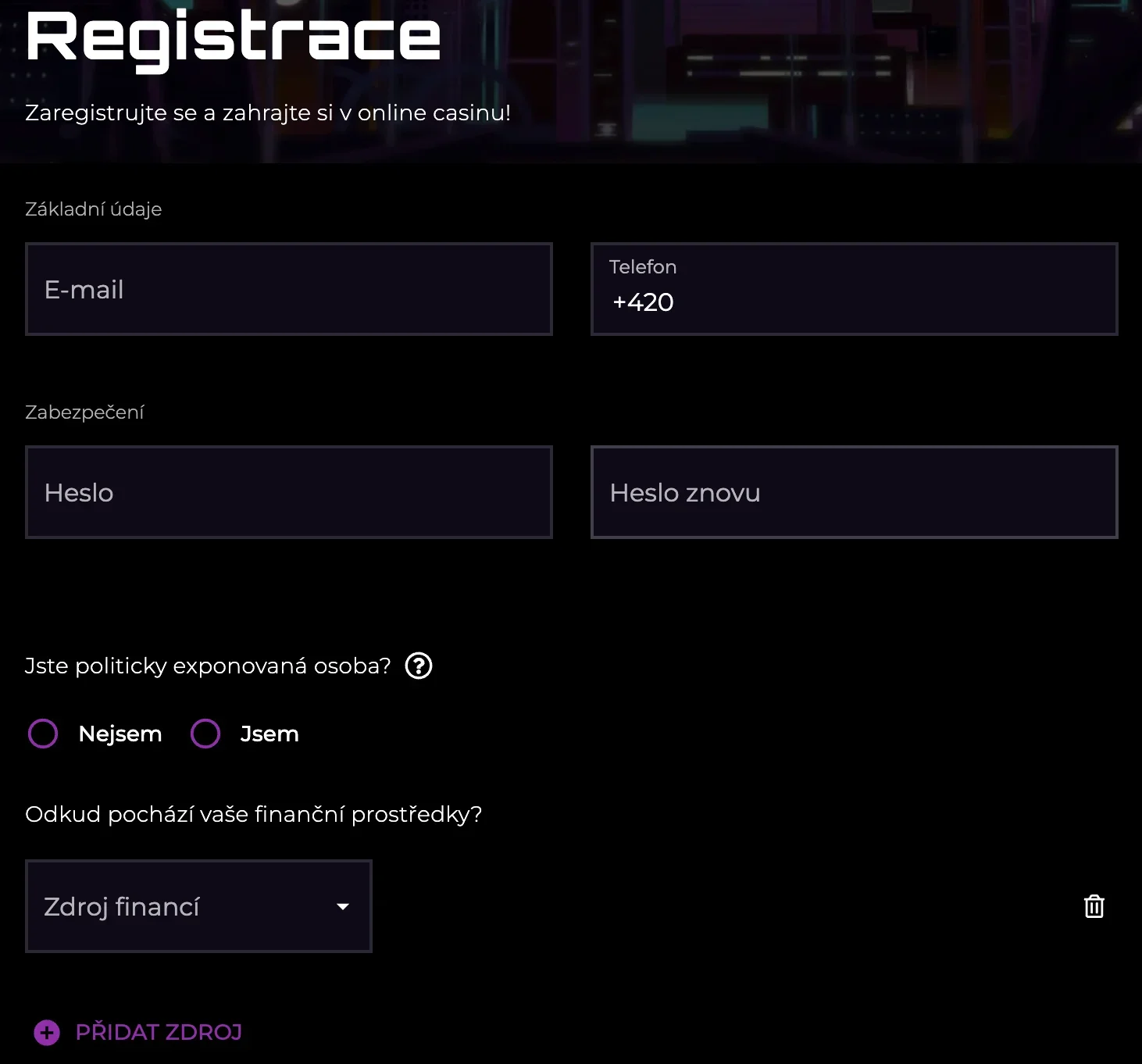
Check our address before entering sensitive information, because fake copies exist. Look for exact spelling rather than relying on a familiar-looking design. For Casinotokyo Casino registration, use the address entered directly instead of an unsolicited message. Stop if anything looks wrong, and avoid submitting credentials through a page reached from an unexpected invitation.
Data You Provide
We collect contact information and essential settings during sign-up, then request personal identity details during verification. These serve different purposes: contact confirmation establishes access, while later checks compare identity records. Read each field carefully before submitting. Keep supporting paperwork available so names, birth details, and address entries remain consistent when requested.
| Data | When We Ask | Requirement |
|---|---|---|
| Email or phone | Sign-up | 6-digit code; valid for 15 minutes |
| Password | Sign-up | At least 8 characters; 1 letter and 1 number |
| Currency | Sign-up | 1 currency per account; USD; cannot change later |
| Country | Sign-up | 1 country per account; accurate selection |
| Name and date of birth | Verification | Real details; adult eligibility |
| Address | Verification | Matching proof; not older than 3 months |
Differences between submitted information and supporting records need correction before checks can be completed. Do not replace genuine details with guesses to make an entry fit. Review spelling, omitted parts, and outdated information carefully. When something needs fixing, explain the discrepancy rather than creating a replacement profile or submitting altered evidence.
Casinotokyo Casino Account Verification
Identity checks connect a profile with its rightful holder. Casinotokyo Casino registration establishes access; verification confirms personal details using supporting evidence. We ask for name, date of birth, and address at this stage. Consistent records help us review submissions without avoidable questions. Enter information as it appears on official paperwork, including complete names rather than shortened versions.
Prepare valid, unexpired photo ID and proof of address. Suitable generic examples include a passport or ID card, alongside a utility bill or bank statement. Casinotokyo Casino registration details must match those records. Photograph complete pages clearly, keeping edges visible and text readable. Avoid glare, blur, covered information, or cropped images that prevent us from reading essential entries.
We require this check once, before the first withdrawal, and review takes from a few hours to 3 business days. Both ID and address evidence must be supplied before payout. Completing Casinotokyo Casino registration does not replace that requirement. Plan ahead instead of leaving preparation until requesting funds. Respond accurately if we need clarification about a submitted record.
Steps After Registration
After Casinotokyo Casino registration, move through these practical checks before playing. Take time to understand available options rather than treating every screen as something to skip. Review personal information first, then make separate decisions about spending and game selection. A deliberate start helps keep entertainment within boundaries chosen in advance.
- Review profile details. Sign in and read saved information. Correct errors before proceeding.
- Consider our welcome offer. Once you have completed all the steps, you can take our welcome bonus: Total Welcome Package — 100% up to $2,700 + 90 Free Spins ($13). Full conditions are in the bonus section of casinotokyo.eu.
- Plan a first deposit. Commit only money already reserved for leisure. Leave essential spending untouched.
- Explore games gradually. Begin with a few titles and read their rules. Understand gameplay before committing funds.
- Set personal boundaries. Choose time and money limits. Visit our responsible gaming page for further guidance.
Keep the same deliberate approach beyond Casinotokyo Casino registration. Pause when play stops feeling enjoyable, and respect limits even after a disappointing session. Chasing losses undermines a planned budget rather than repairing it. Gambling is entertainment, never income.
Casinotokyo Casino Account Security
Protect access from the moment Casinotokyo Casino registration is complete. Contact confirmation works only when messages remain private, so treat incoming codes with care. Separate casino credentials from those used elsewhere. Anyone sharing a device should finish each session properly rather than leaving a signed-in browser available for someone else.
- Create a strong, unique password rather than reusing familiar credentials.
- Never share confirmation codes with another person.
- Sign out after using shared devices.
- Type casinotokyo.eu yourself before signing in.
- Keep contact details current so messages reach you.
We never ask for passwords by message. Treat any request for one as a warning, regardless of how convincing its wording appears. Keep sensitive information out of conversations and screenshots. If access seems compromised, stop using that session and seek assistance without forwarding private credentials as evidence.
Troubleshooting Casinotokyo Casino Registration
Problems during Casinotokyo Casino registration include typing errors, missing confirmation messages, weak credentials, incorrect currency or country selections, age ineligibility, and an existing profile. Read any displayed explanation before trying again. Repeated submissions do not correct inaccurate information. Inspect spelling and selected settings carefully, then identify which stage stopped progress. If already registered, return to existing access rather than attempting another sign-up.
Start by checking message folders, phone reception, and entered contact details. Request a fresh confirmation if the previous one expired, and review credential requirements shown above. For unresolved Casinotokyo Casino registration issues, write to support@casinotokyo.eu with the step involved, what appeared onscreen, device, and browser. Describe any error text accurately. Never send a password, and remove private credentials from screenshots before including them.
Last updated: